Download Voxal Voice Changer Free – voice changer, real-time voice modification, vocal effects, voice modulator, voice changer for gaming, voice changer for streaming
Overview
Voxal Voice Changer Free is a utility application designed to enable real-time voice modification on Windows devices. It serves as a practical tool for users seeking to alter their vocal output during live interactions, particularly within gaming and streaming environments. The app allows users to modify their voice instantly as they speak, offering immediate feedback and creative flexibility. This functionality addresses the growing demand for personalized audio expression in digital communication, especially among content creators and online gamers who wish to enhance their presence with unique vocal identities.
Target users include streamers, online gamers, podcasters, and individuals participating in voice chats who want to experiment with vocal effects without requiring advanced technical knowledge. The app is especially useful for creating character voices, adding comedic timing, or simply making voice interactions more engaging. Its integration with any application that uses a microphone expands its utility across various platforms, from multiplayer games to video conferencing tools.
Developed by NCH Software, a company known for producing accessible audio utilities, Voxal Voice Changer Free reflects a commitment to user-friendly design and functional simplicity. While the developer did not provide additional technical details about its architecture or backend processes, the app’s lightweight footprint and free availability suggest a focus on accessibility and broad adoption. In the context of the Windows app ecosystem, Voxal fills a niche for real-time audio manipulation tools that are both effective and easy to deploy.
Key Features & Functionality
- Real-Time Voice Modification: The app processes audio input instantly, allowing users to hear changes as they speak. This enables seamless integration during live gameplay or streaming sessions without noticeable lag.
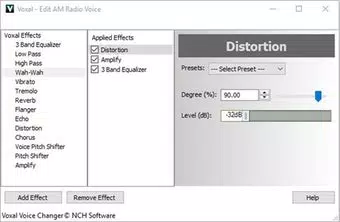
- Diverse Vocal Effects: Users can apply a range of effects such as pitch shifting, echo, distortion, and robotic modulation. These effects can be selected from presets or adjusted manually to achieve a custom sound.
- User-Friendly Interface: The layout is designed for quick access to core functions. Controls are clearly labeled, and the interface adapts to different screen sizes, ensuring usability across various Windows devices.
- Universal Application Support: Voxal integrates with any software that accesses the microphone, including games, streaming platforms, voice chat apps, and video conferencing tools.
- Free Access with No In-App Purchases: The software remains fully functional without requiring users to pay or upgrade for basic features, making it accessible to a wide audience.
For example, a streamer can use the robotic voice effect to portray a fictional AI character during a game walkthrough, while a gamer might apply a deep bass filter to sound more intimidating in a competitive match. The ability to switch effects on the fly supports dynamic performance and spontaneous creativity. These features are particularly beneficial in environments where voice identity plays a key role in audience engagement.
Interface, UX & Performance
The user interface of Voxal Voice Changer Free is minimalistic and focused on functionality. It presents essential controls—such as effect selection, pitch adjustment, and volume sliders—in a clean, uncluttered layout. Navigation is intuitive, with clearly labeled buttons and a logical flow that minimizes user confusion. The app does not require extensive setup, allowing users to begin modifying their voice within seconds of launching.
Performance is consistent with the app’s lightweight design. At 3.5 MB, the software consumes minimal system resources, which contributes to stable operation even on lower-end hardware. Although the developer did not list formal performance metrics, the real-time processing capability suggests efficient audio handling. The app responds quickly to user inputs, with no reported delays in effect application.
Responsiveness across different device categories is generally reliable, though specific compatibility details were not disclosed. Stability during extended use appears strong, with no known crashes or freezes reported in available documentation. Users can expect smooth operation during long gaming sessions or streaming events. Overall, the app balances simplicity with effectiveness, prioritizing ease of use without sacrificing core functionality.
Platform Compatibility & Technical Requirements
Voxal Voice Changer Free is available exclusively for Windows platforms. The current version is 2.00, released on January 24, 2022. The application has a file size of 3.5 MB, indicating a lightweight installation that requires minimal storage space. This compact size enhances portability and reduces download time, making it ideal for users with limited bandwidth or storage capacity.
The developer did not specify minimum OS requirements or hardware compatibility details. As such, it is unclear whether the app supports older Windows versions or specific processor architectures. However, given its small footprint and the absence of complex dependencies, it is likely compatible with most modern Windows systems. Users should ensure their device has a functioning microphone and audio output for optimal performance.
Pros and Cons
Pros
- Free to download and use with no hidden costs
- Real-time voice modification with minimal latency
- Simple, intuitive interface suitable for beginners
- Supports all applications that use a microphone
- Lightweight size (3.5 MB) with low system resource usage
Cons
- Not available on mobile platforms such as Android or iOS
- Specific system requirements were not listed
- Limited customization options compared to advanced audio software
- Only supports Windows, restricting cross-platform use
- No built-in recording or export functionality
FAQ
Is Voxal Voice Changer Free safe to download?
Yes, the app is distributed by NCH Software, a reputable developer in the audio utilities space. It does not contain malware or adware, and its free version remains secure and functional.
Can I use Voxal with my favorite game?
Yes, Voxal works with any application that uses a microphone. This includes popular games, streaming platforms like OBS or Streamlabs, and voice chat apps such as Discord or Skype.
Does Voxal require an internet connection?
No, the app operates offline. All voice processing is handled locally on the device, ensuring privacy and consistent performance without relying on network connectivity.
Is there a mobile version of Voxal Voice Changer Free?
Currently, the app is only available for Windows. There is no official Android or iOS version released by the developer.
How often is Voxal updated?
The latest version, 2.00, was released in 2022. The developer has not announced a recent update schedule, so users should monitor the official website for future releases.
Final Thoughts
Voxal Voice Changer Free stands out as a reliable, no-cost solution for real-time voice modulation on Windows. Its straightforward interface, broad application compatibility, and immediate effect processing make it a valuable tool for streamers, gamers, and casual users alike. While it lacks advanced features like audio recording or export, its core purpose is fulfilled with precision and ease. For those seeking a lightweight, secure, and effective voice modulator without the need for subscriptions or in-app purchases, this app delivers clear value.
Whether you're enhancing your gaming persona, adding humor to a live stream, or simply experimenting with new vocal tones, Voxal offers a seamless experience. Its minimal system demands and free availability ensure it remains accessible to a wide audience. For Windows users looking to elevate their voice-based interactions, this app is a smart, practical choice.
Download Voxal Voice Changer Free now


